Volle Verkaufsflächen verdecken Risiken
Die Aufmerksamkeit der Mitarbeitenden verteilt sich auf Gänge, Kassen, Eingänge und Lagerbereiche. Dadurch kann ungewöhnliche Aktivität in normalen Bewegungsabläufen untergehen.
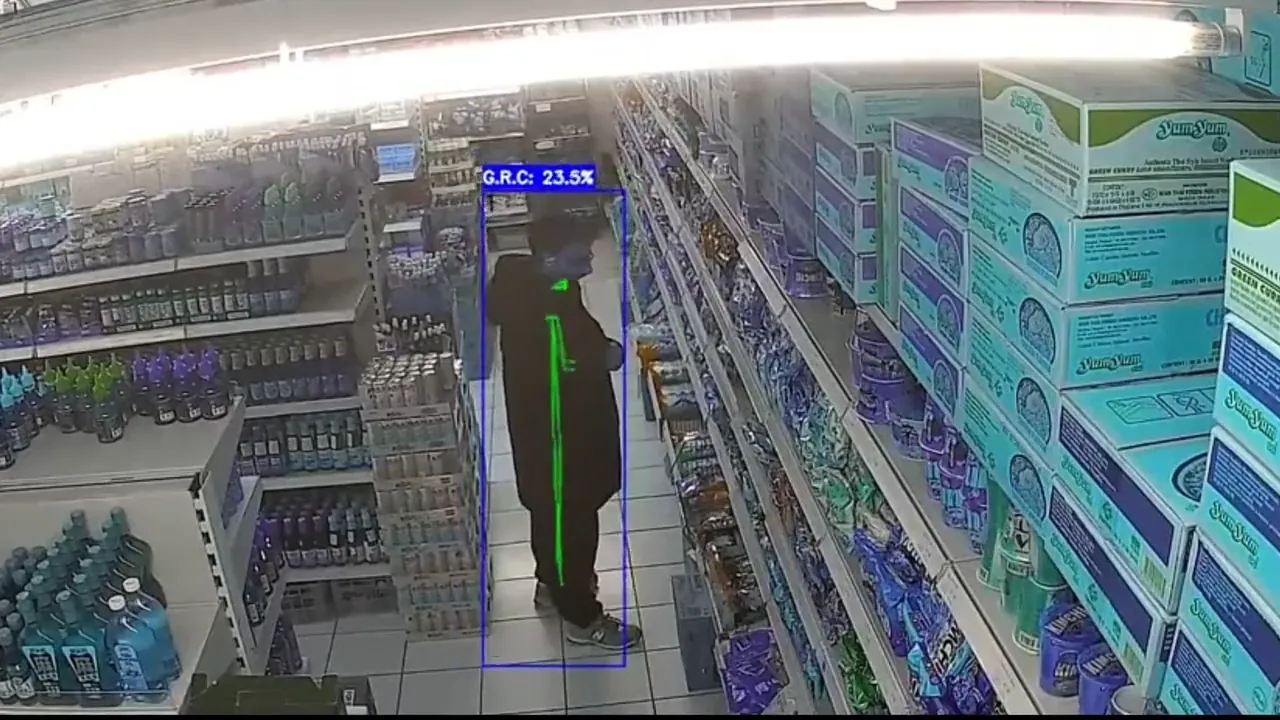
AIn-Guard analysiert Live-Videostreams Ihrer bestehenden Kameras und erkennt ungewöhnliches oder verdächtiges Verhalten, zum Beispiel Verdeckungsbewegungen. Wenn ein Ereignis erkannt wird, sendet das System autorisierten Mitarbeitenden in Echtzeit einen kurzen Videoausschnitt zur Prüfung.
AIn-Guard wird an ausgewählten Standorten in Österreich und Deutschland getestet. Das System analysiert Live-Kamerastreams und markiert Verhalten wie ungewöhnliche Bewegungen oder mögliche Verdeckungsbewegungen. Wenn ein Ereignis erkannt wird, sendet AIn-Guard autorisierten Mitarbeitenden in Echtzeit einen kurzen Videoausschnitt zur Prüfung.
Klassische CCTV-Systeme erzeugen mehr Videomaterial, als Teams realistisch überwachen können. Wichtige Momente bleiben oft in stundenlangen Aufzeichnungen verborgen.
AIn-Guard ändert das, indem bestehende Kameras zur Echtzeit-Erkennung von Ereignissen genutzt werden.
Die Aufmerksamkeit der Mitarbeitenden verteilt sich auf Gänge, Kassen, Eingänge und Lagerbereiche. Dadurch kann ungewöhnliche Aktivität in normalen Bewegungsabläufen untergehen.
Videomaterial wird meist erst geprüft, nachdem etwas passiert ist. Dann ist die Möglichkeit, in Echtzeit zu reagieren, bereits vorbei.
Den richtigen Moment manuell zu finden kostet Zeit, verursacht Verzögerungen und erschwert die Priorisierung der Vorfallsprüfung.
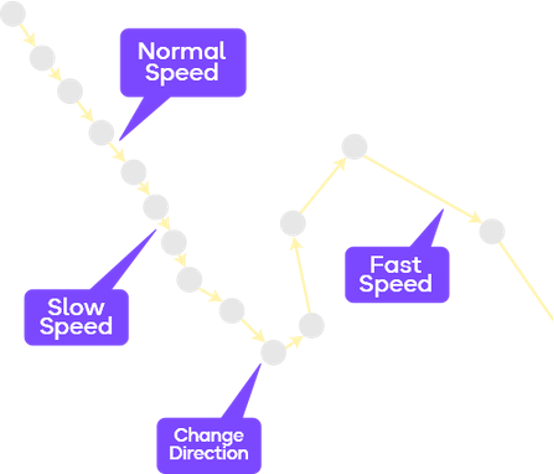
AIn-Guard überwacht Live-Kamerastreams, erkennt ungewöhnliche Bewegungsmuster, erstellt prüfbare Meldungen und benachrichtigt autorisierte Mitarbeitende, damit Vorfälle in Echtzeit geprüft werden können.
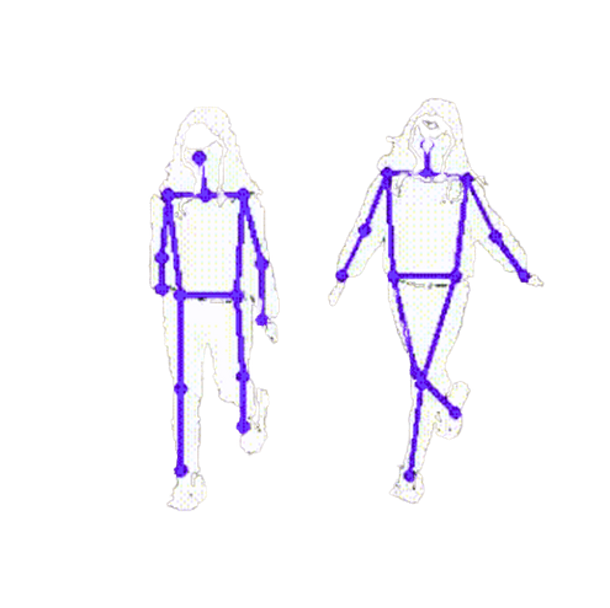
AIn-Guard analysiert Live-Kamerastreams anhand bewegungsbasierter Körperhaltungs- und Bewegungsmuster. Diese Muster werden mit unserem Machine-Vision-Modell verglichen, um verdächtiges Verhalten zu erkennen.
AIn-Guard verwendet keine biometrische Identifikation. Das System analysiert bewegungsbasierte Körperhaltungs- und Bewegungsmuster aus Live-Kamerastreams, um Haltung, Bewegung, Anhalten, Drehen und verdeckungsähnliche Handlungen zu erkennen, die eine Prüfung durch Mitarbeitende erfordern können.
AIn-Guard identifiziert Bewegungsmuster, die auf verdeckungsähnliches oder ungewöhnliches Verhalten hinweisen können, und sendet den relevanten Moment als prüfbare Meldung an autorisierte Mitarbeitende.
KI-gestützte Videoanalyse kann Einzelhandelsteams dabei unterstützen, Vorfälle schneller zu prüfen, Abläufe zu verbessern und vermeidbare Verluste zu reduzieren.
Bis zu 34%
Die Filialleistung kann sich verbessern, wenn Teams potenziell verlustbezogene Ereignisse früher erkennen und prüfen können.
Bis zu 92%
AIn-Guard identifiziert verdächtiges Verhalten in realen Umgebungen mit einer Genauigkeit von 87–92 %.
Ab 3 Monaten
In Filialen mit hohem Schwund oder häufigen Vorfällen kann AIn-Guard eine schnellere Amortisation unterstützen, indem Teams verdächtige Handlungen in Echtzeit erkennen und prüfen können.
Minuten
Cloud-basierte Meldungen werden innerhalb von 15–30 Sekunden zugestellt, verglichen mit 3–5 Minuten bei klassischer Prüfung von Videomaterial.
Bis zu 600 % schneller reagieren als mit klassischen Maßnahmen*Die dargestellten KPIs basieren auf internen Fallstudien und Branchenbenchmarks. Sie stellen keine Leistungsgarantie dar. Ergebnisse hängen von den jeweiligen Einsatzbedingungen und der operativen Umsetzung ab.
Lenken Sie die Prüfaufmerksamkeit auf Filialbereiche mit erhöhtem Schwundrisiko, darunter Eingänge, Gänge, tote Winkel, Hochrisiko-Regale, Regale mit Kleinteilen und Bereiche außerhalb der Öffnungszeiten.
Überwachen Sie die Punkte, an denen Bewegungen beginnen und enden, damit Aktivitäten leichter im Kontext geprüft werden können.
Lenken Sie Aufmerksamkeit auf Regale, in denen kleine Artikel mit hoher Marge leichter verdeckt werden können und für Mitarbeitende schwer dauerhaft im Blick zu behalten sind.
Heben Sie Bewegungen rund um schwundanfällige Produktbereiche hervor, etwa Nahrungsergänzung, Medizin, Proteinriegel, Kaffee, Kosmetik und andere kompakte Waren.
Markieren Sie ungewöhnliche Bewegungen während Zeiten mit geringer Aktivität, Schließphasen oder Zeiträumen, in denen ausgewählte Einzelhandelszonen ruhig sein sollten.
AIn-Guard ist darauf ausgelegt, in Kamera- und Rekorder-Setups zu passen, die viele Einzelhandelsteams bereits nutzen, ohne ein vollständiges Austauschprojekt anzustoßen.
Wir prüfen Kameratyp, Rekorderzugriff, Stream-Verfügbarkeit und Standortlayout, bevor AIn-Guard angebunden wird.
Vor der Einrichtung prüft AIn-Guard den bestehenden Kamera-Stack, das Rekorder-Setup, den Stream-Zugriff und das Standortlayout, um zu bestätigen, was angebunden werden kann.
Kein Austausch erforderlich
Ziel ist es, bestehende Systeme dort anzubinden, wo es möglich ist, statt ein neues Kamerasystem zu erzwingen.
Praktische Prüfung des bestehenden Setups vor der Demo.
Wählen Sie die Bereitstellung, die zum Standort passt, je nachdem, ob das Team einen schnellen Start, lokale Kontrolle oder eine hybride Einrichtung bevorzugt.
Cloud-Bereitstellung, bei der Kundendaten innerhalb der EU bleiben, ausgelegt auf schnellen Start, Remote-Zugriff und einfachere Koordination.
Verarbeitung vor Ort in der Nähe des Kamerasystems, ohne externes Internet für den lokalen Betrieb.
Lokale Edge-Verarbeitung mit Cloud-Benachrichtigungen, Remote-Prüfung und Transparenz über mehrere Standorte.
Konfigurieren Sie Zugriffskontrolle, Aufbewahrungsfristen und Prüf-Workflows, damit Filialen kamerabasierte Sicherheitsmeldungen kontrolliert und datenschutzbewusst nutzen können.
Begrenzen Sie, wer auf Meldungen, Kameraansichten und Vorfallsdetails zugreifen kann.
Unterstützt definierte Aufbewahrungsfristen für Meldungen, Prüfprotokolle und Verweise auf zugehöriges Videomaterial.
AIn-Guard unterstützt die Prüfung durch Mitarbeitende und trifft keine rechtlichen, disziplinarischen oder Durchsetzungsentscheidungen automatisch.
AIn-Guard ist auf Ereigniserkennung und Prüfung ausgerichtet, nicht auf Gesichtserkennung, biometrische Identifikation oder Personenidentifikation.
Entwickelt zur Unterstützung von kontrolliertem Zugriff, definierten Aufbewahrungsfristen, menschlichen Prüf-Workflows und ohne biometrische Identifikation.
AIn-Guard ist darauf ausgelegt, DSGVO-bewusste Sicherheits-Workflows zu unterstützen. Die abschließende Compliance hängt von der jeweiligen Konfiguration, Rechtsgrundlage, Beschilderung, Richtlinien und lokalen Anforderungen der Filiale ab.
Praktische Notizen zu Review-Workflows, Rollout und datenschutzbewusster Bereitstellung.

Eine Dose fehlt im Regal. Damit ist mehr verloren als ein einzelner Verkauf: Eine transparente Beispielrechnung zeigt, warum neun zusätzliche Verkäufe nötig sein können, um allein den Einkauf auszugleichen.

Wie kann KI bei der Diebstahlprävention helfen? AIn-Guard analysiert kompatible Kamerastreams und unterstützt Einzelhandelsteams dabei, auffällige Situationen zeitnah zu prüfen.
Erzählen Sie uns von Ihrem Unternehmen, der Anzahl Ihrer Kameras und Ihren Standorten, damit wir prüfen können, wo AIn-Guard am besten passt.
Dauert weniger als 1 Minute
Das hilft uns, die grundlegende Kamera-Kompatibilität vor dem Gespräch zu prüfen.
Was abgefragt wird
Unternehmenstyp, Kameraanzahl, Standorte und Kontaktdaten.
Antworten auf die häufigsten Fragen zur Nutzung von AIn-Guard mit bestehenden CCTV-Systemen, Mitarbeitenden-Workflows und Anforderungen an einen datenschutzbewussten Einsatz.
Buchen Sie eine Demo, und wir prüfen Ihr Kamera-Setup, Ihre Filialzonen und Ihren Melde-Workflow gemeinsam mit Ihnen.
Demo anfragenJa. AIn-Guard ist darauf ausgelegt, mit bestehenden CCTV-Setups zu funktionieren, sofern Kamerazugriff und Videostream-Kompatibilität vorhanden sind.
Nein. AIn-Guard unterstützt Mitarbeitende, indem Momente hervorgehoben werden, die möglicherweise geprüft werden müssen. Abschließende Entscheidungen bleiben bei autorisierten Personen.
Nein. Das System konzentriert sich auf Bewegungsmuster und ungewöhnliche Aktivität, nicht darauf, Personen anhand ihres Gesichts zu identifizieren.
AIn-Guard ist darauf ausgelegt, datenschutzbewusste Sicherheits-Workflows mit Zugriffskontrollen, Aufbewahrungsregeln, menschlicher Prüfung und Einsatzhinweisen zu unterstützen. Die abschließende Einhaltung hängt vom jeweiligen Filial-Setup, der Rechtsgrundlage, den Richtlinien und lokalen Anforderungen ab.
Ja, der Einsatz sollte jedoch die lokalen Arbeits-, Datenschutz- und CCTV-Regelungen berücksichtigen. Das System sollte so konfiguriert werden, dass unnötige Überwachung vermieden wird.